

Download Power Twitter – free Firefox add‑on for enhanced tweeting
Overview
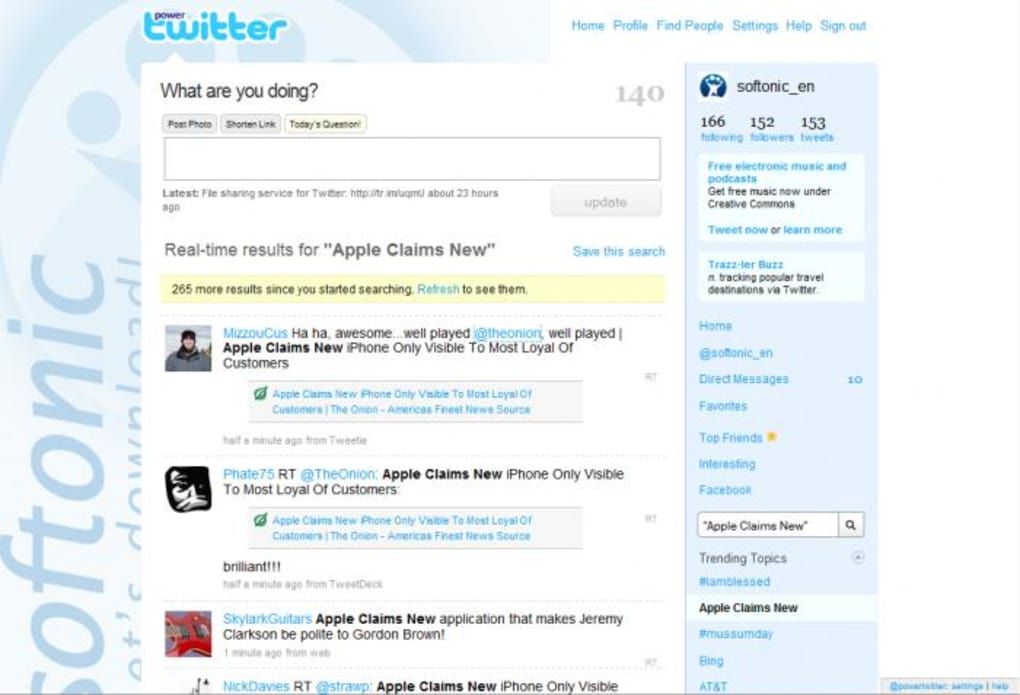
Power Twitter is a lightweight Firefox add‑on designed to extend the native Twitter experience directly from the browser. By injecting three handy buttons—post photo, shorten link, and today’s question—right above the “What’s happening?” box, the extension gives users quick access to common tasks that would otherwise require a separate step or third‑party service. In addition to the new toolbar, Power Twitter expands shortened URLs in the timeline, adds a dedicated “RT” (retweet) tab to each tweet, and automatically surfaces a short, unobtrusive advertisement in the sidebar.
While the ad introduces a modest visual footprint, the overall functionality adds measurable convenience for power users who spend a significant amount of time crafting tweets, sharing media, and tracking links. The add‑on works by loading the Twitter home page a second time in the background, a technique that adds a fraction of a second to page load time but remains well within acceptable performance limits for most modern connections. For Firefox enthusiasts looking for a free, secure way to boost their tweeting workflow without leaving the browser, Power Twitter offers a compelling set of tools that are both intuitive and instantly accessible.
Key Features and Benefits
- Post Photo Button: Choose your preferred image‑hosting service (Twitter native, Imgur, or Flickr) and attach a picture with a single click.
- Shorten Link Button: Reduce URL length using integrated shorteners (bit.ly, tinyurl.com) to save precious characters.
- Today’s Question Prompt: Generate a random conversation starter when you need inspiration for a tweet.
- Expanded URLs: All shortened links in your feed are automatically expanded, letting you see the destination before clicking.
- Retweet (RT) Tab: A dedicated retweet button appears on every tweet, eliminating the need to use the dropdown menu.
- Sidebar Advertisement: A non‑intrusive ad that supports the free development of the add‑on while keeping core features ad‑free.
These features translate into tangible benefits for daily Twitter users. The photo and link shortcuts cut down on the number of steps required to share rich content, directly boosting tweet frequency and engagement. The “Today’s Question” widget serves as a creative spark for writers’ block, while expanded URLs improve security by revealing potential phishing destinations before you click.
The added RT tab streamlines the retweet process, which is especially useful for journalists, marketers, and community managers who need to amplify content quickly. Though the sidebar advertisement introduces a small visual element, it is carefully placed to avoid disrupting the clean aesthetic of Twitter’s default layout. Overall, Power Twitter’s feature set is thoughtfully curated to enhance productivity without overwhelming the user.
Installation, Usage & Compatibility
Step‑by‑Step Installation
- Open Firefox and navigate to the Power Twitter add‑on page on Mozilla’s Add‑ons site.
- Click the “Add to Firefox” button and confirm the permission request in the pop‑up dialog.
- After the download completes, Firefox will automatically install the extension and prompt you to restart the browser for optimal performance.
- Once Firefox restarts, visit
https://twitter.com. You will see three new buttons above the tweet composer and the RT tab on each tweet.
How to Use the Core Functions
After installation, using Power Twitter is intuitive. To post a photo, click the “Post Photo” button, select the image file, choose your preferred host, and press “Upload.” The image link will be inserted automatically into your tweet box. For shortening links, click the “Shorten Link” button, paste the long URL, and select the shortening service; the shortened URL replaces the original text.
If you’re stuck for ideas, click “Today’s Question” to receive a random prompt that you can tweet directly or use as a conversation starter. The RT tab appears beneath each tweet; simply click it to retweet without opening the tweet’s detail view. All shortened URLs in your timeline will display the full destination when hovered over, giving you confidence before you click.
Power Twitter is built specifically for the Firefox browser, which runs on Windows, macOS, and Linux platforms. The add‑on does not require any additional software and works with any Firefox version released after 78.0, ensuring broad compatibility across desktop environments. Mobile Firefox users can also install the add‑on, though the UI adapts to a smaller screen, and some toolbar buttons may be hidden to preserve space. Because the extension runs client‑side, it does not collect personal data beyond what is necessary for its functionality, aligning with Firefox’s strong privacy standards.
Pros, Cons & Frequently Asked Questions
Pros
- Free and open‑source, with no hidden subscription fees.
- Integrates seamlessly into the existing Twitter UI, reducing context switches.
- Offers useful shortcuts for media sharing and link management.
- Improves security by expanding shortened URLs.
- Lightweight impact on page load time.
Cons
- The sidebar advertisement, while modest, adds visual clutter.
- Requires Firefox; not available for Chrome, Edge, or Safari.
- Loading Twitter twice may be noticeable on very slow connections.
- Limited customization of the added toolbar (colors, placement).
FAQ
Is Power Twitter safe to use?
Yes. The add‑on is reviewed by Mozilla before being listed in the Add‑ons store, and it does not collect personal data beyond what is required to operate the photo and link services.
Can I disable the sidebar advertisement?
Currently the ad is bundled with the free version. Users who prefer an ad‑free experience can support the developer through a small one‑time donation, which unlocks a premium build without ads.
Does Power Twitter work with the new Twitter redesign?
The add‑on is regularly updated to stay compatible with Twitter’s UI changes. As of the latest release, it works with both the classic and the refreshed layouts.
Which image‑hosting services are supported?
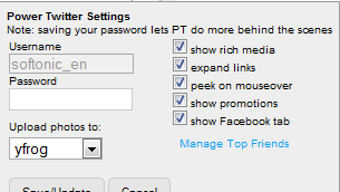
Power Twitter lets you choose between Twitter’s native image upload, Imgur, and Flickr. You can set your default provider in the add‑on’s options page.
Will the add‑on slow down my browsing?
The extension adds a minimal overhead—roughly 0.3‑0.5 seconds to the initial Twitter load—because it loads the page twice in the background. On standard broadband connections this impact is barely perceptible.
Review Summary: Power Twitter delivers a solid set of productivity tools for frequent tweeters. While the ad placement and Firefox‑only limitation are drawbacks, the convenience of built‑in photo uploads, link shortening, and URL expansion outweighs the minor inconveniences. Overall rating: 4 out of 5 stars.
Conclusion & Call to Action
For anyone who spends a considerable amount of time on Twitter via Firefox, Power Twitter provides a free, secure, and easy‑to‑install solution that streamlines everyday tasks. The added toolbar, expanded URLs, and retweet shortcut reduce the friction of content creation, allowing you to focus on the conversation rather than the mechanics. Although the sidebar advertisement introduces a slight visual compromise, the trade‑off is reasonable given that the add‑on remains free and actively maintained. If you’re ready to boost your tweeting efficiency, simply click the download link below, add the extension to Firefox, and start enjoying a more powerful Twitter experience today.
Free Download






